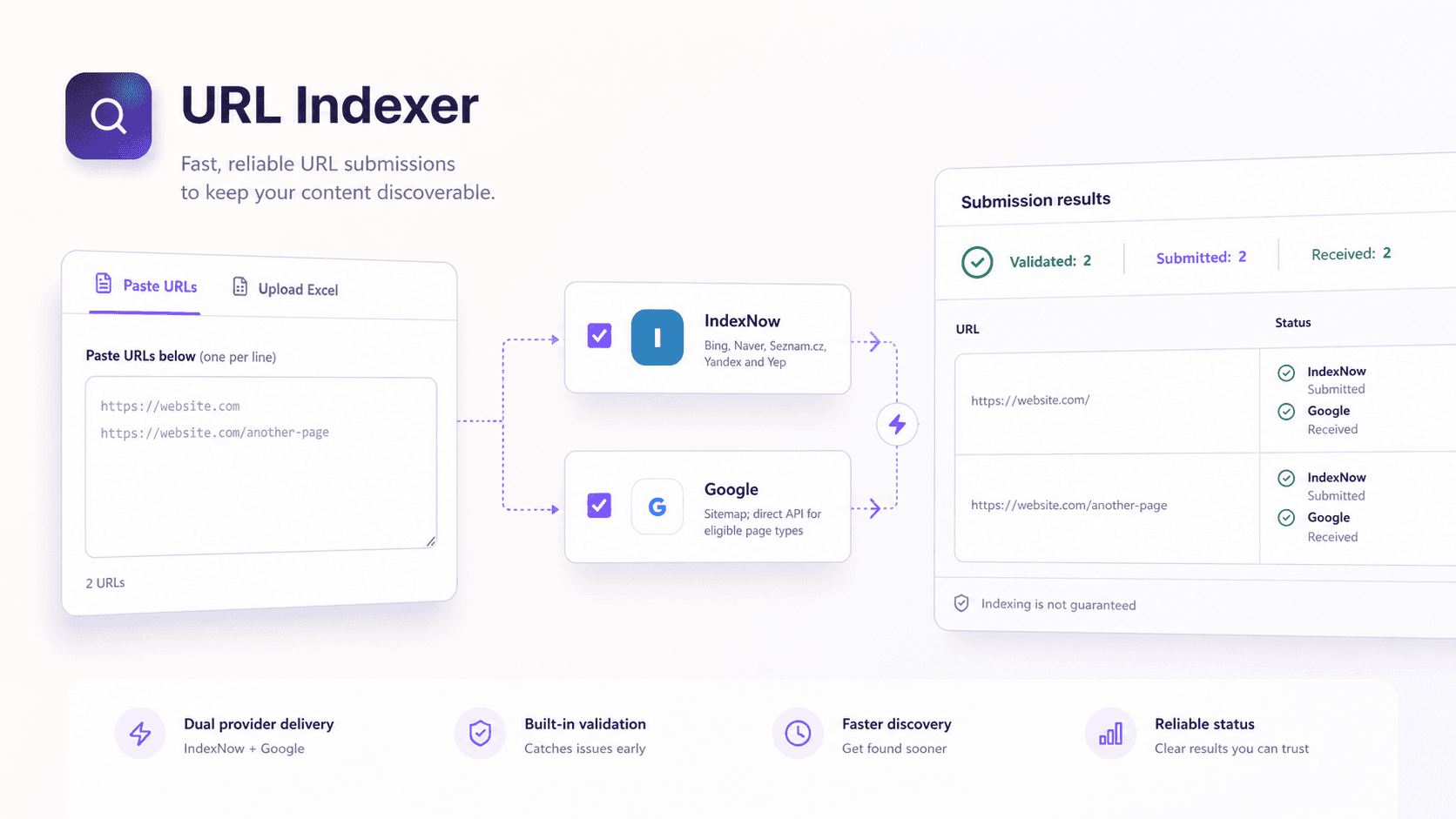
This guide explains how to build a bulk URL indexing tool like the one shown above. The tool accepts pasted URLs or a spreadsheet, validates every row, routes each page to the correct provider and returns an honest result. The important part is not the submit button. It is the logic that prevents unsupported requests and misleading success messages.
What you are building
The simplest version needs a frontend form and one protected server endpoint. The browser collects URLs and displays results. The server validates ownership, applies provider rules, holds credentials and makes external API requests. Keep provider logic in separate adapters so IndexNow and Google can change without forcing a full rewrite.
Step 1: Define the provider rules before writing the interface
Start with a small routing matrix. It should define which provider can receive each page type and action. This prevents the interface from offering combinations that the backend must later reject.
- IndexNow: updated or deleted URLs from a verified host, submitted in batches of up to 10,000.
- Google standard webpages: add or update the canonical URL in the site's sitemap.
- Google job posting pages: use the Indexing API for URL_UPDATED or URL_DELETED requests.
- Google livestream pages: use the Indexing API when the page contains the required BroadcastEvent markup inside a VideoObject.
Step 2: Create a row model for every URL
Treat every URL as a structured record. Do not pass a loose string array through the whole application. A useful row contains an ID, URL, action, page type and selected providers. Add validation errors and provider results after processing.
- url: the absolute canonical URL
- action: updated or deleted
- pageType: standard, jobPosting or livestream
- providers: indexNow, google or both
- validation: valid, duplicate or invalid with a reason
- results: one response object for each selected provider
Use the same model for pasted input and spreadsheet input. This keeps validation, submission and result rendering consistent. It also makes CSV export straightforward.
Step 3: Build paste and spreadsheet inputs
The fast path is a textarea with one URL per line. Split on line breaks, trim whitespace and ignore empty rows. Assign the current action and page type to each new record. Show the count before submission.
For larger jobs, accept CSV and XLSX files. Parse the file in the browser, map column headings to the row model and send only normalised JSON to the server. Provide a template with columns for URL, action and page type. Add drop-down validation inside the spreadsheet so editors use recognised values.
Step 4: Validate before making any API request
Validation is the most important part of a bulk URL indexing tool. Run basic checks in the browser for immediate feedback, then repeat all security and ownership checks on the server. Client-side validation can always be bypassed.
- Parse the value with the platform URL parser instead of a custom regular expression.
- Allow only HTTPS or HTTP protocols.
- Compare the hostname with a server-side allowlist of verified domains.
- Remove fragments and tracking parameters when they are not part of the canonical URL.
- Normalise trailing slashes according to the site's canonical policy.
- Reject credentials, local addresses, private IP ranges and unexpected ports.
- Remove duplicate canonical URLs from the same batch.
- Check that the action, page type and provider combination is supported.
Return validation counts before submission: valid, duplicate, invalid and total. Keep the reason beside each rejected row. This is more useful than one generic error at the top of the page.
Step 5: Verify the IndexNow host
Generate an IndexNow key and store it as a deployment secret. Publish a plain-text verification file containing that key on the verified host. The key location controls which URL paths you are allowed to submit, so placing it at the domain root gives coverage across the host.
Before enabling the submit button, let the backend confirm that the key file is publicly available and contains the expected value. Show this as a readiness check in the interface. The IndexNow documentation explains host verification and the POST body.
Step 6: Build the IndexNow adapter
Create one server function that receives validated same-host URLs. Split the list into batches of 10,000. Send each batch as JSON to the IndexNow endpoint with the host, key, key location and URL list. Add a request timeout so a slow provider cannot hold the application open indefinitely.
- POST to https://api.indexnow.org/indexnow
- Set Content-Type to application/json; charset=utf-8
- Include host, key, keyLocation and urlList in the body
- Treat HTTP 200 or 202 as accepted, not indexed
- Capture safe error details for any other response
- Retry only temporary failures and use exponential backoff
Store provider status per batch and map it back to each URL. Do not expose the key, service account or raw upstream response in the browser.
Step 7: Build the Google routing adapter
The Google adapter has two paths. Standard pages use sitemap discovery. Eligible job posting and livestream pages can use the direct Indexing API. Make this decision from the validated page type, not from a toggle that users can misuse.
For standard pages, confirm that the canonical URL is included in the current sitemap. If the URL is missing, return an instruction to update the sitemap. Do not report direct submission. Google recommends absolute canonical URLs and limits each sitemap to 50,000 URLs or 50 MB uncompressed. The official sitemap guide covers the complete format.
For eligible direct submissions, enable the Indexing API in a Google Cloud project. Create a service account, add its email as an owner of the Search Console property and obtain an OAuth access token with the indexing scope. Keep the private key in the server's secret store. Google's prerequisite guide lists the setup sequence.
- Use URL_UPDATED when an eligible page is added or changed.
- Use URL_DELETED only after the eligible page has actually been removed.
- Submit one URL per request or group up to 100 requests in a multipart batch.
- Respect the approved quota and never create extra accounts to bypass it.
- Record notification receipt separately from later indexing status.
Step 8: Design honest result statuses
A useful result model needs more than success and failure. Each provider returns its own state. The row-level status should summarise those states without hiding partial problems.
- Complete: every selected provider accepted the request or confirmed the expected discovery route.
- Partial: at least one provider accepted the request and another needs attention.
- Needs attention: validation, configuration or provider errors prevented useful submission.
- Not eligible: the selected page type cannot use the requested direct API route.
Step 9: Handle deleted pages correctly
A deleted action must reflect the real page state. Check that the URL returns 404 or 410 before presenting the removal request as valid. If a standard page still returns 200, tell the user to remove it properly or apply a supported noindex rule. An API notification cannot replace the correct HTTP response.
Step 10: Protect the endpoint
An unrestricted indexing endpoint can be abused as a proxy or used to consume provider quotas. Require authentication and authorisation. Apply rate limits by user and host. Keep a domain allowlist on the server and reject any URL that does not belong to a verified property.
- Validate input again on the server with a strict schema.
- Block local, private and link-local network targets to reduce SSRF risk.
- Set request timeouts and maximum batch sizes.
- Keep all provider credentials in environment secrets.
- Log the user, time, action, URL count and provider outcome.
- Do not log access tokens, private keys or full credential files.
Step 11: Test the workflow before deployment
Unit-test URL normalisation, duplicate detection, provider routing and combined statuses. Mock external API responses for accepted, rejected, rate-limited and timeout cases. Add integration tests for spreadsheet imports and server validation. Use a dry-run mode that shows the exact URLs and routes without sending them.
- Test a valid same-host updated page.
- Test duplicates with different fragments or tracking parameters.
- Test an external domain and a private network address.
- Test a standard page incorrectly assigned to the Google Indexing API.
- Test a mixed batch where IndexNow succeeds and Google configuration fails.
- Test a deleted URL that still returns HTTP 200.
- Test provider timeouts and quota responses.
Step 12: Deploy with a readiness panel
Before accepting a batch, show whether the sitemap is reachable, the IndexNow key is verified and the Google configuration is ready. Disable routes that are not configured. This turns deployment problems into visible setup tasks rather than confusing submission errors.
Use environment variables for the site origin, IndexNow key and Google credential reference. After deployment, submit a small test batch and verify both the application log and provider response. Then enable larger batches.
The implementation lesson that mattered most
The interface took less thought than the status model. A large submit button is easy. A system that explains what was accepted, what was only added to a sitemap and what needs technical attention is much more valuable. That honesty is what makes the tool safe for editors as well as SEO specialists.
Free tool · no account needed
Start the Google route with a clean XML sitemap before adding provider automation.
Runs entirely in your browser. No uploads, no tracking, no paywall.
Build an XML sitemap →